建設ドキュメント管理システム

建設書類の管理を シンプルに。

AutodocsはRFA・RFI・指示書・変更指示(VO)・図面・日報まで、着工から引き渡しまでのすべての建設書類を管理します。すべての書類に恒久的な番号が付き、適切な担当者へ回付され、署名が残ります。

書類番号自動採番
RFAType
·
PRJ02Project
·
CONFrom
·
CSCTo
·
FACSubject
·
0421Running
·
R01Rev

審査中Rev 01
CONCSC
自由に設定でき、発番後は固定される番号。振り直しも上書きもありません。画面でも紙でも監査ログでも同じ番号です。
OBS ROUTED
CON → CSC
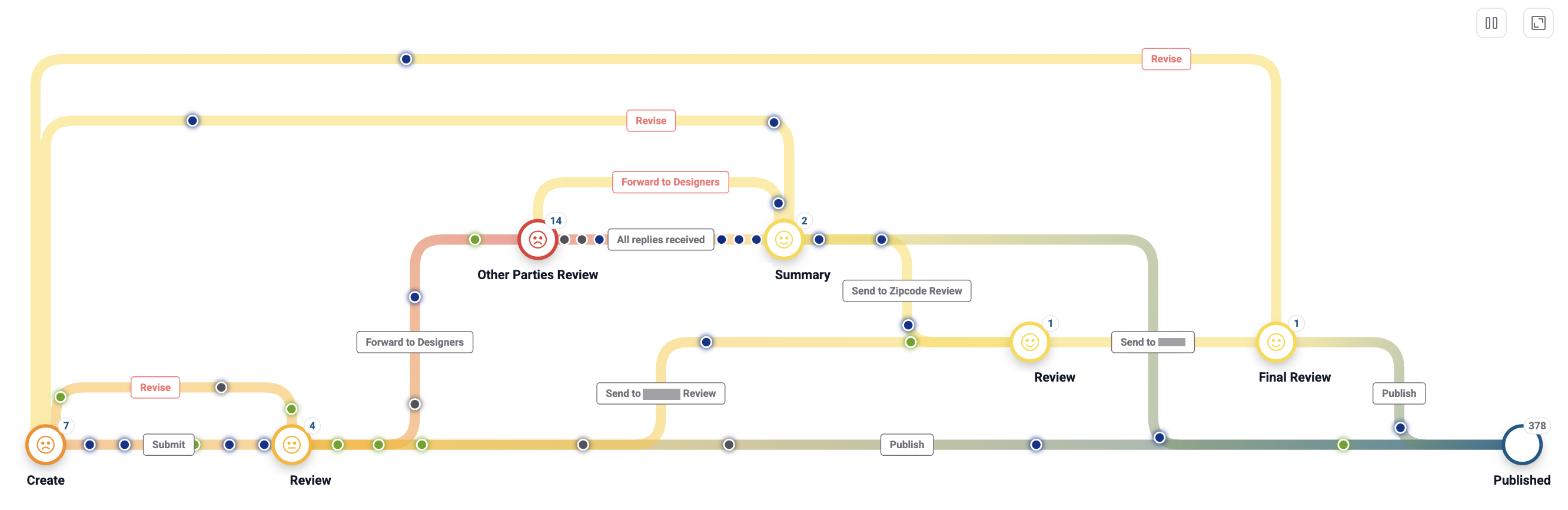
Traffic Map — every document on its routeFrom a real project
Autodocs Traffic Map — documents moving through Create, Review, Other Parties Review and Published, with live counts at every station
OWASP audit closedRestore drill: 1.8M rows in 11 minRTO 4 hr · point-in-time 7 daysYour data never trains AI models21項目の回答を読む
日々の業務

書類を追いかける時間を 減らす。

同じプロジェクト、同じチーム。働き方だけが変わります。

これまでのやり方
シンプルなやり方
The site group chat asks for the latest drawing. Three versions get attached.
Nobody asks. The approved revision is the only one in the system.
Hours preparing binders for the weekly meeting.
Open the dashboard. The summary is ready.
A VO surfaces in a meeting. No one can say who ordered or signed it.
Every VO references its site instruction, with signatures and values.
Dozens of binders searched page-by-page for evidence.
Print the report. The full signature chain is in it.
データベースから直接

実プロジェクトを いまこの瞬間に集計。

この数字はAutodocsの本番データベースから直接読み出され、継続的に更新されます。件数のみを表示し、プロジェクトの詳細は非公開です。

0
発行済み書類
0
参加企業
0
回答済みRFI
Documents on the platform — cumulative by monthSep 2026 · 10,336
+528docs/month
average, last 3 full months
2.2× vs last year
書類種別
RFA4,636Approval requestsRI1,974Inspection requestsDR1,376Daily reportsRW1,137Work requestsRFI787Information requestsEI150Engineer's instructionsSI135Site instructionsVO103Variation ordersPMI35PM instructionsCONTRACT2ContractsSAFETY1Safety
Autodocsの強み

着工から 引き渡しまで。

共有ドライブにはできない、Autodocsの5つのこと。

Keep every document in order.
Every record is structured, numbered and searchable, from day one to handover.
See budget and contracts.
Contract and VO values sit beside the documents and update as work is approved.
Coordinate without chasing.
Requests route to the right person automatically.
Keep every party aligned.
Employer, Engineer and Contractor see the same live record.
Lose nothing. Miss nothing.
Due dates, overdue flags, and a history nobody can rewrite.
FIDICの三者

三者が、ひとつの 正本で働く。

発注者・エンジニア・請負者のFIDIC三者が同じ書類の上で作業し、それぞれの役割に必要な情報だけが見えます。

OWNEmployer (Owner)
See the whole project without waiting for reports.
  • Approvals arrive in order, ready to sign.
  • Real-time view of progress, budget and overdue items.
  • PM Instructions carry contract weight and a full trail.
ENGEngineer (Consultant / CM)
Run every review from one queue.
  • Every document line flows through you, in a clear review queue.
  • Technical answers and design reviews are recorded, signed and citable.
  • VO price evaluation is a formal signed step in the workflow.
CONContractor
Submit from site. Track every request.
  • Create RFA, RFI, work requests and daily reports from site.
  • Know the status of every request.
  • Finish a drawing and submit it for approval in the same system.
すべての書類はエンジニア(CM)を経由します。見落としはありません。
書類モジュール

12種類の書類を ひとつのシステムで。

書類ごとに専用のフォーム・採番・承認経路。選んで確認できます。

RFARequest for Approval
RFA·PRJ02·0421
In review

モジュール
Curtain wall mock-up sample
回付先 · OBS
CONCSC
Feature cinema

Watch it work, not a slideshow

Demo clips cut straight from the product, pulled live from the changelog — the day a feature ships with a clip, it shows up here.

การลงนามเอกสารดิจิทัลบนไฟล์ PDF2.0.2-ADD-01
ผู้ตรวจสอบสามารถบันทึกหมายเหตุและทำเครื่องหมายบนไฟล์เอกสารที่ผู้รับเหมาจัดส่ง ลงลายมือชื่อของตน และจัดเก็บเป็นเอกสารฉบับลงนามเพื่อส่งต่อไปยังขั้นตอนถัดไป เอกสารที่ลงนามแล้วจะมีตราประทับดิจิทัลและรหัส QR สำหรับตรวจสอบความถูกต้องและยืนยันว่าเอกสารมิได้ถูกแก้ไขภายหลัง ทั้งนี้ระบบรองรับการจัดเก็บลายมือชื่อได้หลายรูปแบบและเลือกใช้ได้ในขณะลงนาม
ワークフロー

現場に合わせて 設計できるワークフロー。

書類ごとに承認経路を持ち、手順・関係者・SLAまでプロジェクトの実際の進め方に合わせて調整できます。
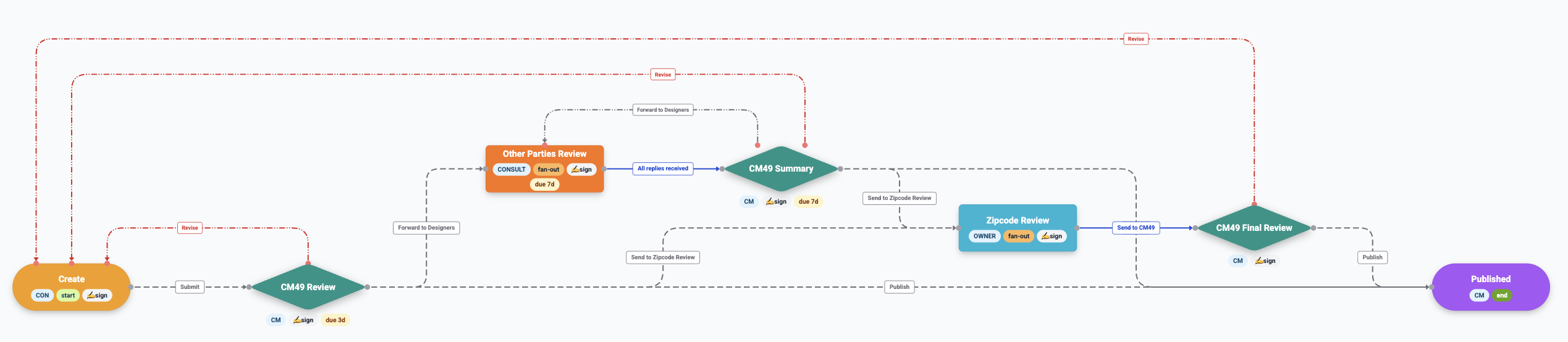
Workflow builder — an RFA template as configuredFrom a real project
The Autodocs workflow builder — an RFA template running Create, review stages with signing and due dates, fan-out to other parties, revise loops and Published
各ステップに日数でSLAを設定できます(例:CM審査は3日以内、他者回答は5日以内)。期限超過フラグと事前通知つき。
契約とコスト

すべての契約と、 1バーツまで追跡。

契約と変更指示(VO)は、元となった書類の隣にあり、承認のたびに金額が更新されます。

契約と資金の流れ
Illustrative values — real contract figures stay private to the project.
変更指示(VO)— ライブ集計VAT別
増額合計
139,000.00
減額合計
0.00
VO·PRJ02·0001
Increase glass panel thickness
+75,000.00
VO·PRJ02·0006
Upgrade to HVAC system
+64,000.00
合計+139,000.00 THB
Tax & currency built in
Project tax rate and currency are set once — every contract and VO computes consistently.
SI → VO, linked
A variation order references the site instruction that caused it — the money trail starts at the source.
Values hidden by role
Parties not involved in a VO cannot see its monetary value — commercial detail stays contained.
Autodocs Intelligent

フォローアップは システムに任せる。

AIが書類台帳を読み、引き渡し日を脅かす項目を検知します。通知はLINEとメールでチームに届きます。

AIリスク要約
SI·0017 — schedule-critical: delay impacts the handover date.
SI·0010 — fire-safety inspection: delay affects visitor safety.
VO·0024 — high-cost change on a critical system; review first.
LLINE連携
What’s overdue?
6 RFIs pending. Longest: “Floor load capacity” — 118 days (due 25 Nov).
Which ones relate to glass work?
2 items: glass panel dimensions (due 9 Dec) and revised panel design.
メールダイジェスト
HELLO,
URGENT DOCUMENTS ARE WAITING
SI·0022
Structural material change
01 Apr
VO·0008
Scope adjustment — west wing
01 Jan
RFA·0007
Protective coating material
09 Dec
既定では無効で、プロジェクト単位で有効化します。分析に送る前に契約・価格・ユーザー情報は除外されます。
信頼と統制

すべてのステップに 責任の所在を。

建設書類は法的文書です。すべてのステップに署名・記録・権限管理があります。

FIDIC applied
Instruction and variation workflows follow FIDIC contract practice — SI, EI and VO carry the authority the contract defines.
Digital signature
Every review step is signed on screen with name and timestamp — approvals carry real accountability and resist forgery.
Three-level permissions
Confidential, role-based and assigned documents — contracts stay private to their parties; VO values hide from outsiders.
ISO 19650-aligned drawings
Structured drawing numbers, floor-by-floor location dashboards, and revision-controlled sets from tender to as-built.
Full audit trail
Every action, party and timestamp is logged. Printable reports carry the whole signature chain — defensible to handover.
セキュリティ

情報部門が検証できる 回答を用意しています

大企業の調達は契約の前にセキュリティ調査票を送ってきます。当社はその21項目にすでに回答済みで、内容は実際に構築されたシステムに基づいています。

21
assessment items answered
1,808,737
rows restored in a drill
11 min
to restore the database
4 hr
recovery time objective
OWASP audit closed
A full internal audit against OWASP Top 10:2021, API Security Top 10:2023 and ASVS 5.0 Level 2 — every finding documented, every fix carrying a regression test. External penetration testing can be arranged on request.
A restore that was actually run
On 27 August 2026 a copy held outside the database provider was restored into an empty database in another region: 183 tables and 1,808,737 rows came back with no missing rows and no foreign-key violations, in 11 minutes. The drill repeats at least once a year.
Recovery you can plan around
Point-in-time restore to any moment within 7 days, daily snapshots kept 30 days, and a 4-hour recovery time objective for the service as a whole. Hosting, database and file storage each run on an independent provider, so no single one can take the service down.
Access proven at every request
Role-based permissions from an administrator-editable matrix, enforced on the server rather than hidden in the interface, with an email one-time-password step-up at sign-in.
Logged, including the refusals
Authentication events, workflow transitions, outbound email, defect history and authorization denials are each recorded — a denied attempt leaves a trace, not silence. Authentication events are kept for a year.
Six sub-processors, each under agreement
Every provider that touches your data is named with its purpose, covered by a data processing agreement, risk-assessed before engagement and reviewed annually — and we give 30 days written notice before any of them changes.
公開文書 · 最終確認 2026年8月27日
Autodocsの位置づけ

ツールには適所がある。 足りない部分を埋める。

ドライブはファイルを、チャットは会話を担う。Autodocsは建設書類にまだ必要な部分を加えます。

製品画面

プロジェクト全体を ひとつのコンソールで。

すべての行に番号・関係者・ステージが並ぶ書類台帳。

RFA/Receive
5
PT
DAILY REPORT
RFA12
Document
Receive4
Sent
REQUEST INFO
SITE INSTRUCTION
RFA · Receive
4 awaiting your review · Project PRJ02 — Phase 2
+ New RFA
No.SubjectPartyStage
RFA·PRJ02·0421Curtain wall mock-up sampleCON → CSCIn review
RFA·PRJ02·0418Waterproofing method statementCON → CSCApproved
RFA·PRJ02·0415Rebar coupler submittalCON → CSCChange req.
RFA·PRJ02·0410Facade anchor detailCON → CSCPublished
RFA·PRJ02·0405Lift shaft layoutCON → CSCFinal review
更新履歴からライブ配信

毎週、 良くなっていく。

Autodocsは活発に開発が続いています。この一覧はリリースノートから直接読み込まれ、出荷した瞬間にここへ表示されます。

v2.0.5最新リリースAUTODOCS 2.0.5ライブ28 Aug 2026
  • New
    Document Files: a file store organised by document
    A project file store arranged the way the documents are: type, then document number, then revision — with every file attached to that document gathered in one place, whether it came in with the form, during a review step, in a reply, as the signed PDF, or as a site photograph. Switch between a list and a thumbnail grid; the preview pane on the right holds its space permanently, so the file list is no longer squeezed when a file is selected. Select several files and download them as one ZIP, search across the whole store, filter by company, star the files you return to, and see what you opened recently. PDF files open in the application itself. Files can be shared as a link, either to the people already on the document or publicly, with an expiry date, revocable at any time, and forwarded to LINE in one button. A project administrator can lock a folder for a whole document type or for a single document; a locked document disappears from everything that user can see — counts, search results and starred items included — so nothing hints that a hidden document exists.
    クリップを見る
    2.0.5-ADD-01
  • New
    The Drawer: a project-wide file index with ranked search
    One index of every file attached anywhere in the project, with a summary console and a search that ranks results by relevance across file names and file metadata. Results only ever show files the person searching is already entitled to see, under the same document visibility rules as everywhere else.
    One index of every file attached anywhere in the project, with a summary console and a search that ranks results by rele2.0.5-ADD-02
  • New
    Search inside PDF content, not just file names
    Search now reads the text inside PDF files as well, so a document can be found by wording that appears in it even when nobody remembers what the file was called.
    Search now reads the text inside PDF files as well, so a document can be found by wording that appears in it even when n2.0.5-ADD-03
  • New
    A console for every link you have shared
    One page listing the links you have shared — a project administrator sees the whole project's. Each row says which document it opens, who can open it, how long it has left, how many times it has been opened, and who created it. Links can be closed from here, and clicking a row goes to that document's file store.
    クリップを見る
    2.0.5-ADD-04
  • New
    Filter the rows you print by the values in a column
    The printed document register can now be narrowed properly: several values in the same column, and filters on sender and recipient, which had none before. Print only the documents from the contractor to the construction manager that are under review or approved and fall due this month. The number of rows printed always matches the number that actually match.
    2.0.5-ADD-05
  • New
    An integration API, opened on request
    An organisation that wants document status inside its own systems can now ask for a connection. It is closed and customer-scoped rather than a public service: it is enabled one project at a time, credentials are issued for that project alone, both are off until asked for, and switching it off withdraws access immediately. The connection is read-only and returns metadata only — document number, status, version, current workflow stage — and can never return document content, attachments, or a link to a file.
    2.0.5-ADD-06
+11 件がこのリリースに過去のリリースv2.0.416 件の改善v2.0.335 件の改善更新履歴をすべて読む

あなたのプロジェクトで 確かめてください。

プロジェクトの概要をお聞かせください。実際の書類でAutodocsの動きをご案内します。

1営業日以内にご返信します。お電話は 02-118-6324 ext. 4