Features · Mobile & LINE

Mobile & LINE

The full product on the phone — and the news delivered into your chat. — 21 shipped features below.

Document Files: a file store organised by document

A project file store arranged the way the documents are: type, then document number, then revision — with every file attached to that document gathered in one place, whether it came in with the form, during a review step, in a reply, as the signed PDF, or as a site photograph. Switch between a list and a thumbnail grid; the preview pane on the right holds its space permanently, so the file list is no longer squeezed when a file is selected. Select several files and download them as one ZIP, search across the whole store, filter by company, star the files you return to, and see what you opened recently. PDF files open in the application itself. Files can be shared as a link, either to the people already on the document or publicly, with an expiry date, revocable at any time, and forwarded to LINE in one button. A project administrator can lock a folder for a whole document type or for a single document; a locked document disappears from everything that user can see — counts, search results and starred items included — so nothing hints that a hidden document exists.

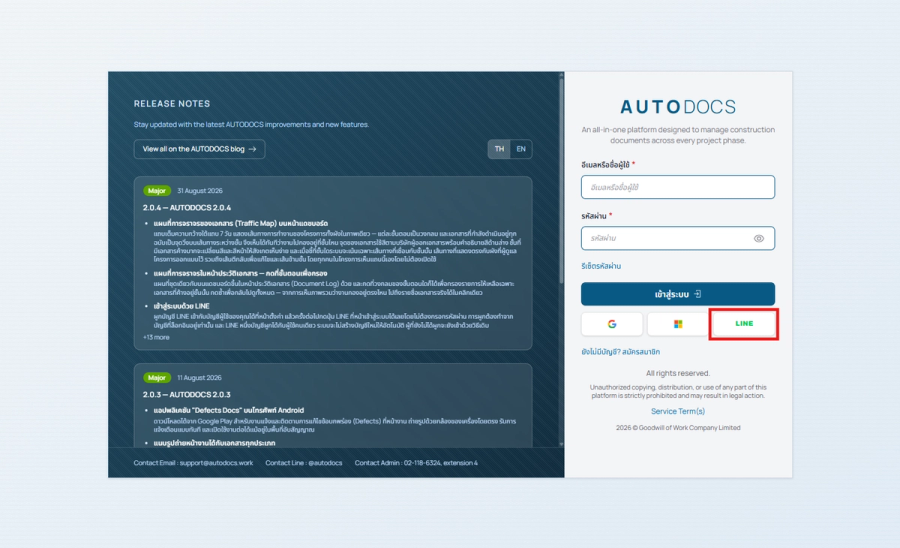
Connect your LINE account to your user account in Settings, and from then on the LINE button on the sign-in page gets yo

Sign in with LINE

Connect your LINE account to your user account in Settings, and from then on the LINE button on the sign-in page gets you in without a password. Linking can only be done from an account you are already signed in to, one LINE account belongs to exactly one user, and no account is ever created automatically — anyone who has not linked signs in exactly as before.

Share a document into a LINE chat or group

A share button on the document page and in the Document Log sends a document straight into a LINE chat or group, or copies a link for you to paste yourself. The recipient gets a card carrying the number, the subject and the current stage, with a button that opens it. Several documents can go at once from the selection bar in the Document Log, and the button is there on a phone too — sharing into the site group is work done on site.

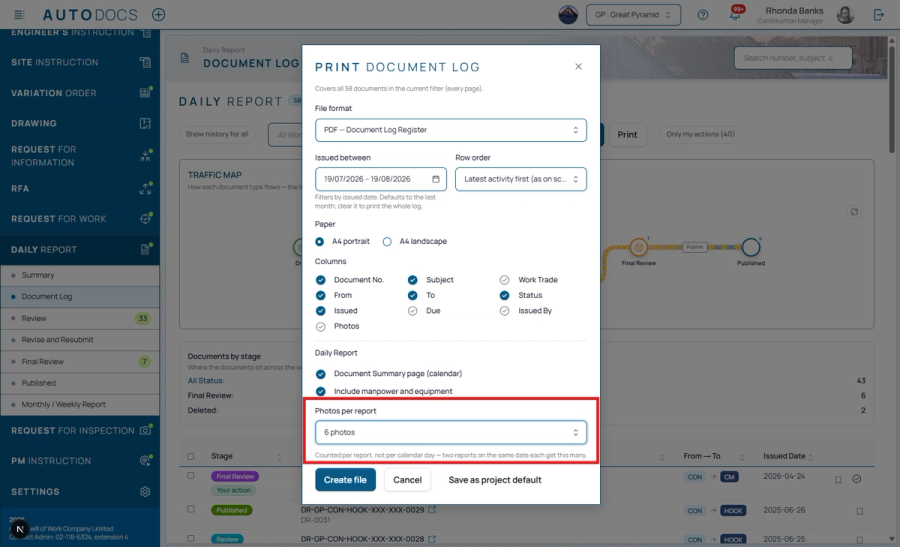
The print dialog gains a section that belongs to the Daily Report alone: print the manpower broken down by trade, and th

Manpower and photo counts on the Daily Report printout

The print dialog gains a section that belongs to the Daily Report alone: print the manpower broken down by trade, and the number of photos on each report. Manpower reads as a line under the subject rather than a column, because what you want from it is who was on site that day, not a number to sort by.

The device camera and pull-to-refresh in the mobile app

The photo work that was still going through a file picker — reporting and following up defects, the inspection gallery, and staging photos for a site inspection (RI) — now opens the device camera directly in the mobile app. And any page can be refreshed by pulling down on it, sidebar badges included, instead of reaching for the refresh button in the header.

The sign-in page and its release-notes panel

The Google, Microsoft and LINE buttons are down to their logos and share one row, splitting the width evenly between whichever are enabled — with words on them a third button fell to a third line and pushed the footer off the screen. The release-notes panel beside the form switches between Thai and English, always shows the three most recent releases, and gives every item a heading, the way the changelog on the website does.

Improved2.0.42.0.4-CHG-02

The "Defects Docs" app for Android phones

Available on Google Play, for raising and following up site defects in the field: photos straight from the device camera, instant notifications, and it keeps working in areas with no signal.

Camera-first forms on mobile

For document types built around site photography, the project administrator can set the form to open the camera straight away on a phone.

Finer per-type form settings

Choose for each document type whether it appears in the mobile app, whether the AI drafting button is offered, and whether the form shows the Create By field. Document types hidden from the menu no longer appear on the guided create page.

Improved2.0.32.0.3-CHG-03

My Watch List

Bookmark the documents and drawings you care about and see them together in a dashboard card, each with an AI-written progress summary, and receive bell and email notifications for every movement. Documents you create are watched automatically.

Notification when a drawing is revised

Anyone watching a drawing in their Watch List is notified the moment a revised sheet is uploaded.

Notification improvements

Notifications are grouped into finer categories (document work, defects, reports to our team, and system messages) that can be switched off individually, old notifications are cleared automatically, and the support-reply email can be edited per project like every other email type.

Improved2.0.32.0.3-CHG-04

Printed site inspections (RI)

The per-round inspect-and-rectify history and each checklist line's evidence photos now appear under that line on the printed form; previously they could only be seen on screen.

Improved2.0.32.0.3-CHG-05
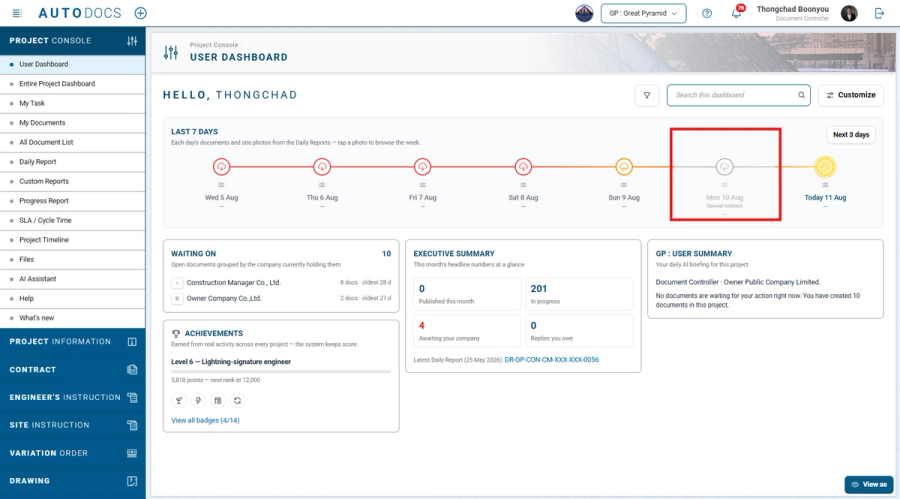
Site holiday calendar — Project administrators can record the project's holidays in Settings, and the week timeline on t

Site holiday calendar

Project administrators can record the project's holidays in Settings, and the week timeline on the dashboard shades those days with the holiday's name.

Redesigned Document Log

A From/To column with company emblems, a new status-label style, file previews, and a clearer event timeline. The log supports filtering by company and reviewing earlier versions of a document.

Improved2.0.22.0.2-CHG-02

Redesigned notification emails

Document summaries are presented as cards with dark-mode support and project and sender-company emblems. Urgent documents are consolidated into a single email addressed correctly to primary and copy recipients, with improved Thai typography.

Improved2.0.22.0.2-CHG-03

Full mobile support

The display across all parts of the system has been optimized for use on mobile phones.

Improved2.0.22.0.2-CHG-04

Opening a document from an email without signing in

Recipients can open the document file straight from a notification email. The document is shown according to the recipient's own permissions, links can be given an expiry date and revoked, and every opening is recorded. The project administrator enables this capability, which is off by default.

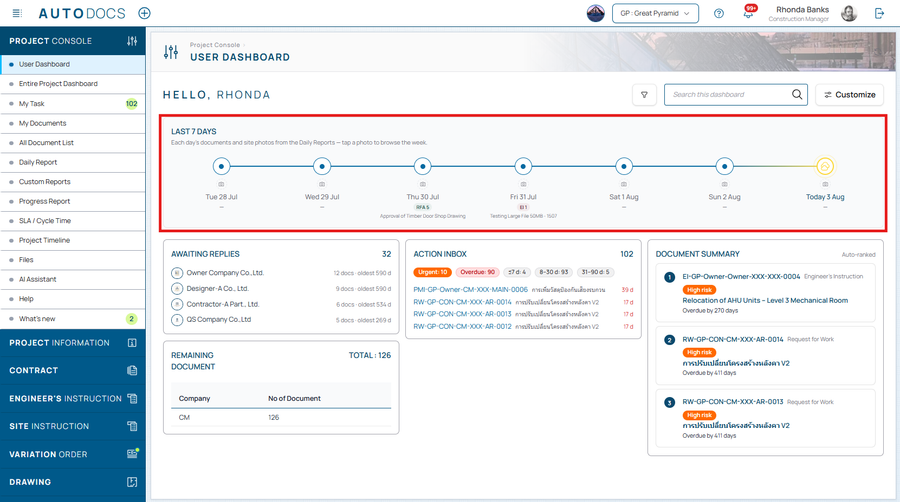
A "Last 7 days" card on the user dashboard — A timeline of the past week where each day carries its weather from the dai

A "Last 7 days" card on the user dashboard

A timeline of the past week where each day carries its weather from the daily report (shaded by severity), that day's document count, a short note, and the site photos, which open full size on the spot. On a phone it condenses to the last three days.

The 3D plan view, and the project overview pages

A 3D plan view (Timeliner) with an S-curve progress chart, a project areas overview, a directory of everyone involved, and a project map.

Notifications and email summaries

A notification bell for recent activity, alerts to everyone involved whenever a document moves, daily/weekly email summaries, and admin-editable email messages.

All featuresSignatures & SecurityDrawingsSite WorkDashboards & Traffic MapDocuments & WorkflowPlatform & AI

See it on your project — request a demo →