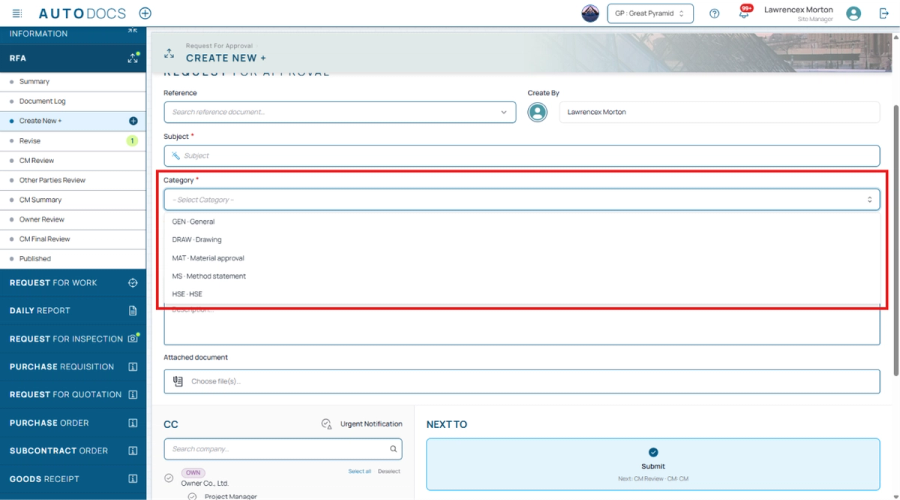
Features

Every feature, straight from the record

119 features across 5 releases — every entry below comes from the changelog, with the clip or screenshot it shipped with. New releases grow this page by themselves.

Features · 21 items

Mobile & LINE

The full product on the phone — and the news delivered into your chat.

Document Files: a file store organised by document

A project file store arranged the way the documents are: type, then document number, then revision — with every file attached to that document gathered in one place, whether it came in with the form, during a review step, in a reply, as the signed PDF, or as a site photograph. Switch between a list and a thumbnail grid; the preview pane on the right holds its space permanently, so the file list is no longer squeezed when a file is selected. Select several files and download them as one ZIP, search across the whole store, filter by company, star the files you return to, and see what you opened recently. PDF files open in the application itself. Files can be shared as a link, either to the people already on the document or publicly, with an expiry date, revocable at any time, and forwarded to LINE in one button. A project administrator can lock a folder for a whole document type or for a single document; a locked document disappears from everything that user can see — counts, search results and starred items included — so nothing hints that a hidden document exists.

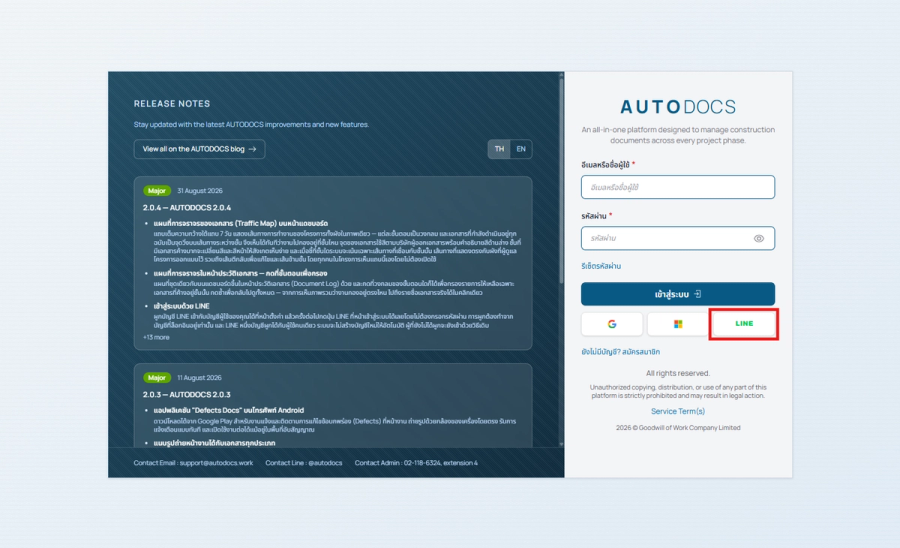
Connect your LINE account to your user account in Settings, and from then on the LINE button on the sign-in page gets yo

Sign in with LINE

Connect your LINE account to your user account in Settings, and from then on the LINE button on the sign-in page gets you in without a password. Linking can only be done from an account you are already signed in to, one LINE account belongs to exactly one user, and no account is ever created automatically — anyone who has not linked signs in exactly as before.

Share a document into a LINE chat or group

A share button on the document page and in the Document Log sends a document straight into a LINE chat or group, or copies a link for you to paste yourself. The recipient gets a card carrying the number, the subject and the current stage, with a button that opens it. Several documents can go at once from the selection bar in the Document Log, and the button is there on a phone too — sharing into the site group is work done on site.

All 21 in Mobile & LINE
Features · 16 items

Signatures & Security

Digital signatures, sealed PDFs, permissions, sign-in and the audit trail.

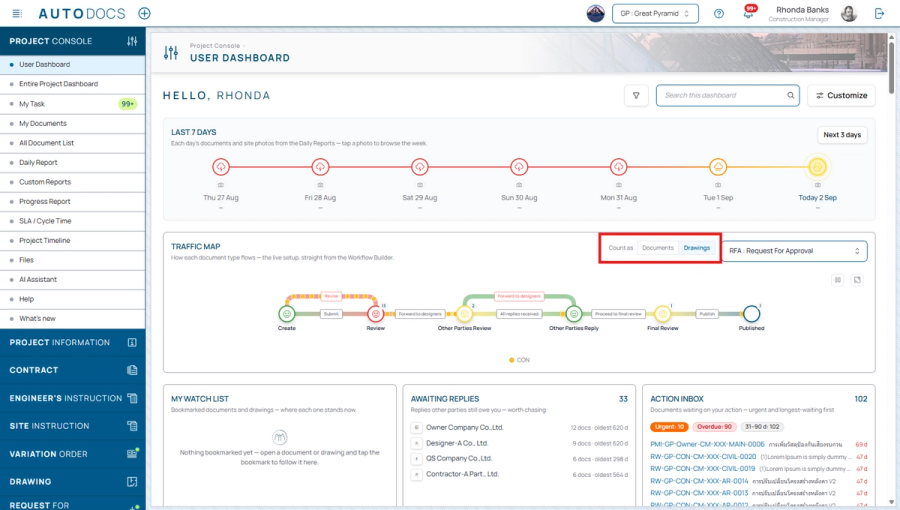
Traffic Map on the dashboard

A full-width band under the 7-day strip that puts the project's whole workflow in one picture — each stage is a circle, and every document in progress is a dot travelling the path between stages, so you can see at once where work is piling up. Dots carry the colour of the company that raised the document, with a colour key underneath; a stage holding a lot of documents changes colour and expression so it is hard to miss; and pointing at a stage highlights only the paths connected to it. The paths match the workflow the project administrator designed, including return-for-revision routes and stage-skipping forwards. Everyone on the project sees the band without having to turn it on.

Digital signing on PDF documents

Reviewers can annotate and mark up files submitted by contractors, apply their own signature, and save the result as a signed document that is forwarded to the next stage. Signed documents carry a digital seal and a QR code for verifying authenticity and confirming that the document has not been altered. Multiple signatures may be stored per user and selected at the time of signing.

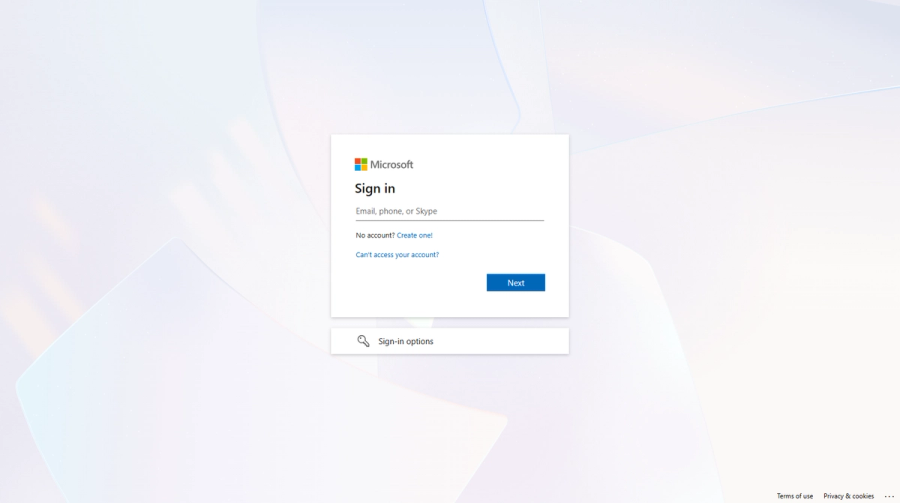
Sign in with a Microsoft account — For organisations that use Microsoft accounts. Signing in with an existing username o

Sign in with a Microsoft account

For organisations that use Microsoft accounts. Signing in with an existing username or an email address remains supported.

All 16 in Signatures & Security
Features · 14 items

Drawings

The drawing register — sheets, titleblocks, transmittals and live status.

Printing and exporting the Document Log

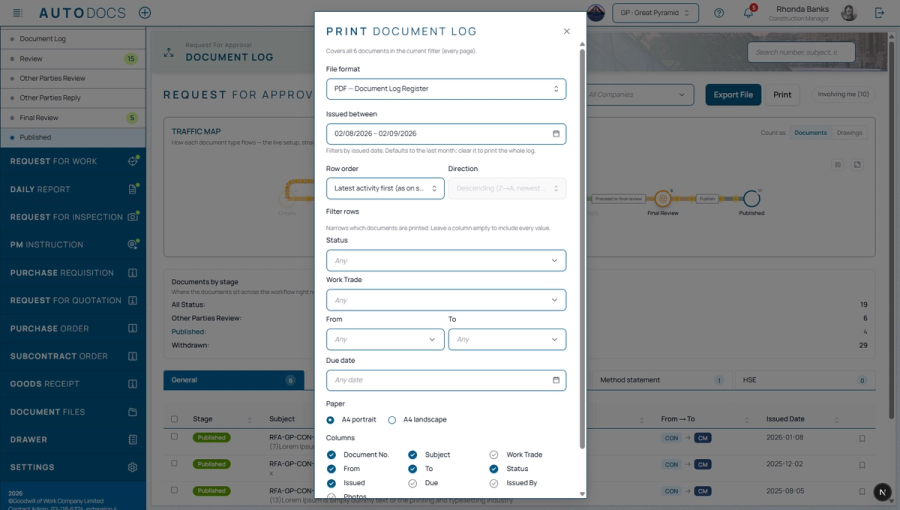
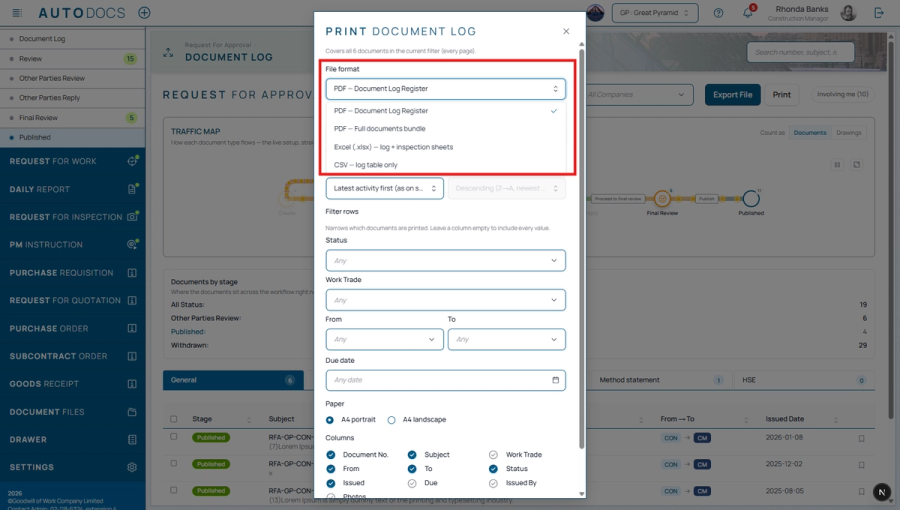
A print button on every Document Log offers four outputs: a register PDF (choose the columns, with the project letterhead), a single bound PDF of every document in full with a cover sheet, table of contents and continuous page numbers, plus Excel and CSV — all following the filters on screen, or just the selected rows, with print settings remembered per document type.

Exporting the drawing register as a PDF (Drawing List)

Choose the scope by drawing status and building, seeded from the filters on screen, and download a PDF file directly.

Summary cards on the drawing status page — Drawing counts per stage as cards that filter the list on click, with overdue

Summary cards on the drawing status page

Drawing counts per stage as cards that filter the list on click, with overdue counts and a week-over-week trend, plus a building tab strip for filtering the register. The register also loads faster.

All 14 in Drawings
Features · 6 items

Site Work

Daily reports, inspections, checklists, site photos and the weather log.

Site photos on any document type

Project administrators can add a photo field to any document type, setting a minimum and maximum number of photos, caption and area boxes, camera-only capture, and embedding the date, time and location on each photo. Attached photos appear on the document page, on the printed form, and in ZIP downloads (which now also include Daily Report photos, previously missing from the ZIP).

Daily Report

Daily Report: an on-site weather widget (fetched automatically), records of manpower/equipment, work progress, and on-site photos uploaded as a gallery.

All 6 in Site Work
Features · 11 items

Dashboards & Traffic Map

The whole project on one screen — and exactly where work is stuck.

Set a dashboard card to the height you want

Drag a card's bottom edge to fix its height; anything taller scrolls inside the card. Double-click or press Delete to go back to the natural height. The height is remembered per card group, and survives reordering the cards or changing their width.

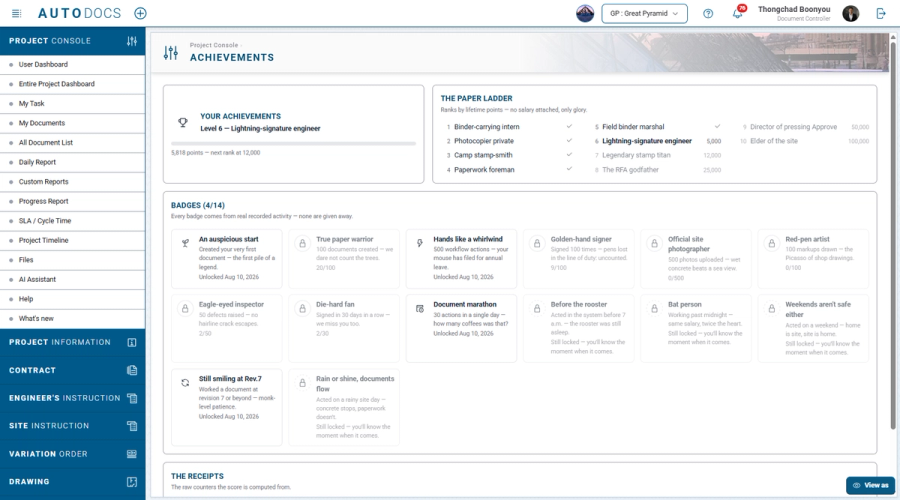
Levels and badges (Achievements) — Points accumulate from real work across every project, climbing a ten-step ladder, wi

Levels and badges (Achievements)

Points accumulate from real work across every project, climbing a ten-step ladder, with fourteen badges in Thai construction-site humour such as "Before the rooster" and "Documents through the rain". Past work is counted retroactively from the day you started. See them on a dashboard card, your own achievements page, and a level chip in the project directory; colleagues' achievements are visible, but there is no leaderboard.

The dashboard board is resizable

Drag its right edge to narrow or widen it; the cards repack between three, two and one columns, and the chosen width is remembered.

Improved2.0.32.0.3-CHG-11
All 11 in Dashboards & Traffic Map
Features · 15 items

Documents & Workflow

Every document type, on approval routes you design yourself.

Choose a date range before printing the Document Log

The print dialog now takes a date range, defaulting to the last month. Printing used to sweep the entire history every time, so a routine job that wanted "last month" got a hundred-page file. Clear the range to get everything as before — and the range you chose is printed on the register header, so nobody files the document away believing it covers the whole project.

Photos attached at a review stage

Contractors can attach photos, such as after-repair photos, directly at their own stage. The project administrator chooses which stages ask for photos and the minimum count. Stage photos join the document history and the printed form just like photos added at creation.

Adding a recipient to an open forwarding round

While replies are pending, another party can be added to the same round without starting a new one.

All 15 in Documents & Workflow
Features · 36 items

Platform & AI

The AI assistant, email, search and the everyday experience.

One index of every file attached anywhere in the project, with a summary console and a search that ranks results by rele

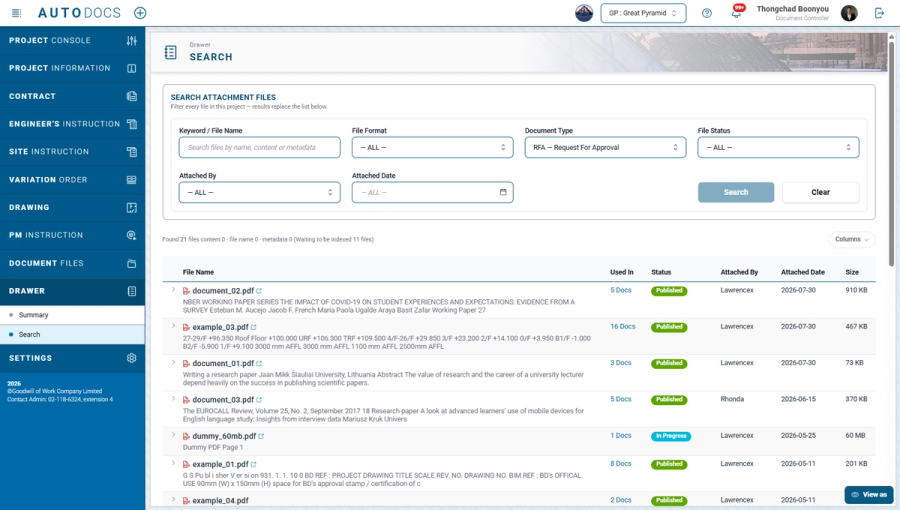
The Drawer: a project-wide file index with ranked search

One index of every file attached anywhere in the project, with a summary console and a search that ranks results by relevance across file names and file metadata. Results only ever show files the person searching is already entitled to see, under the same document visibility rules as everywhere else.

Search now reads the text inside PDF files as well, so a document can be found by wording that appears in it even when n

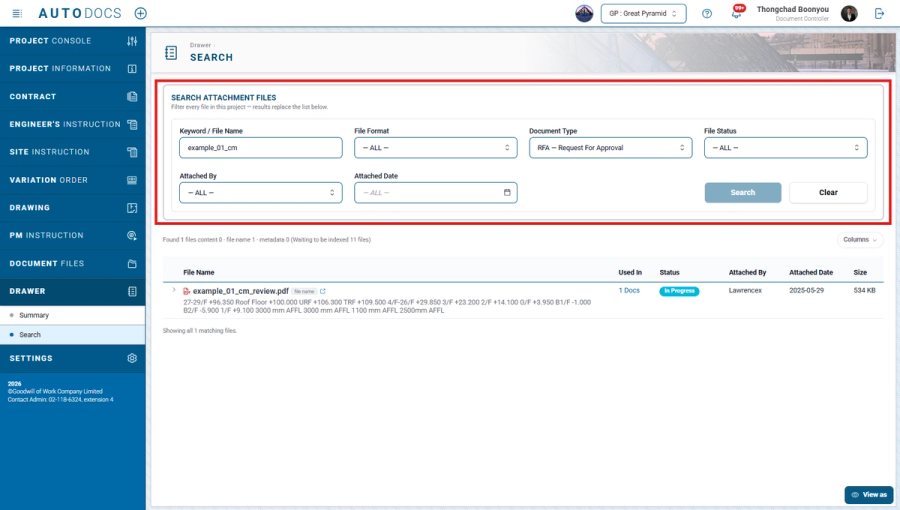
Search inside PDF content, not just file names

Search now reads the text inside PDF files as well, so a document can be found by wording that appears in it even when nobody remembers what the file was called.

A console for every link you have shared

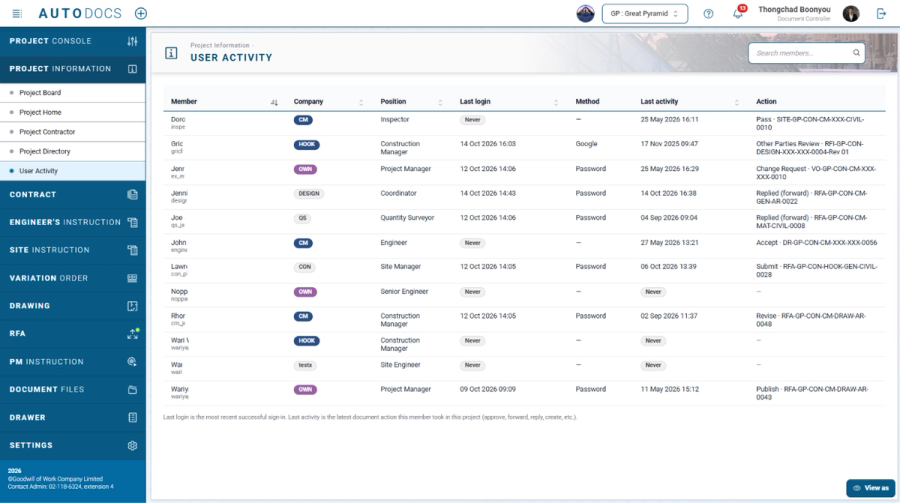
One page listing the links you have shared — a project administrator sees the whole project's. Each row says which document it opens, who can open it, how long it has left, how many times it has been opened, and who created it. Links can be closed from here, and clicking a row goes to that document's file store.

All 36 in Platform & AI

Shipped, dated, numbered

Every feature above carries the reference code it shipped under — follow it to the full release note on the blog.

Changelog on the blog ↗PricingRequest a demo