Features · Drawings

Drawings

The drawing register — sheets, titleblocks, transmittals and live status. — 14 shipped features below.

The Traffic Map: count drawings, click through, and read more easily

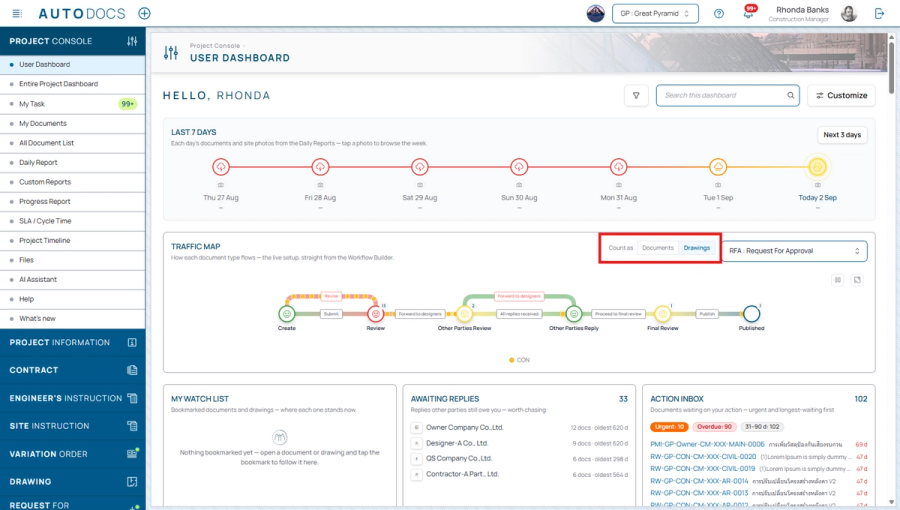
A switch on the card header changes what the whole map counts — documents or drawings — because one approval document can carry several drawings, so the real backlog for the person managing drawings is not a count of documents. The switch appears only on document types that actually carry drawings. Clicking a stage's weather symbol now goes straight to that stage's documents, and the paths and count labels no longer overlap each other.
Improved2.0.52.0.5-CHG-01

Printing and exporting the Document Log

A print button on every Document Log offers four outputs: a register PDF (choose the columns, with the project letterhead), a single bound PDF of every document in full with a cover sheet, table of contents and continuous page numbers, plus Excel and CSV — all following the filters on screen, or just the selected rows, with print settings remembered per document type.

Exporting the drawing register as a PDF (Drawing List)

Choose the scope by drawing status and building, seeded from the filters on screen, and download a PDF file directly.

The drawing register on a phone

Rows become cards carrying the drawing number, name, building and review stages, laid out for a small screen, and the file viewer rearranges its controls to fit.

Improved2.0.32.0.3-CHG-06
Summary cards on the drawing status page — Drawing counts per stage as cards that filter the list on click, with overdue

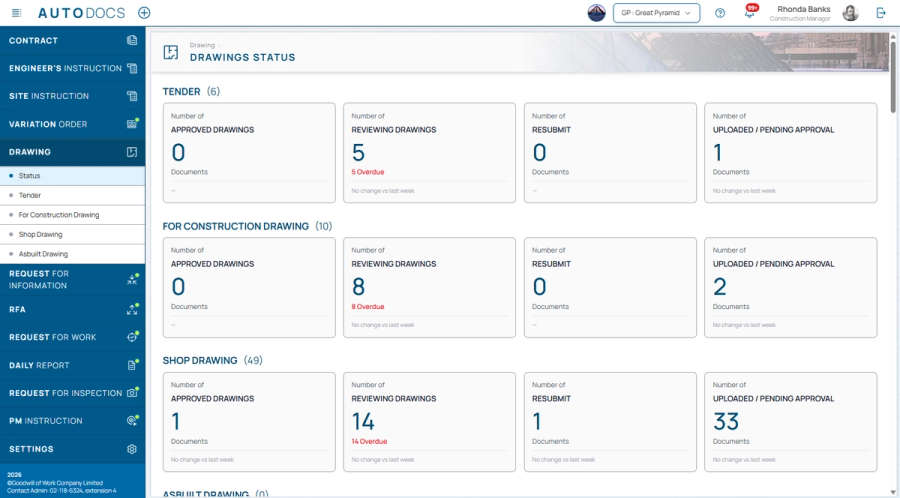
Summary cards on the drawing status page

Drawing counts per stage as cards that filter the list on click, with overdue counts and a week-over-week trend, plus a building tab strip for filtering the register. The register also loads faster.

A Drawing Types settings page — Project administrators can add and edit the drawing categories that appear under the Dra

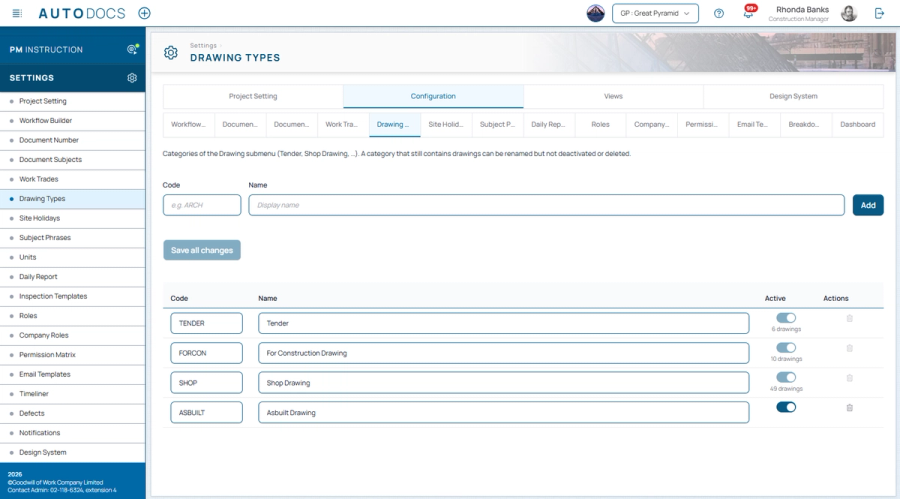
A Drawing Types settings page

Project administrators can add and edit the drawing categories that appear under the Drawings menu themselves. A category still holding drawings can be renamed but never deleted, so no drawing is orphaned.

Improvements to the workflow design tool

A clearer diagram layout, conditional stages for branching a review path, undo and redo while editing, easier drawing of connections between stages, and a record of when the configuration was last saved.

Improved2.0.22.0.2-CHG-06

The drawing register table

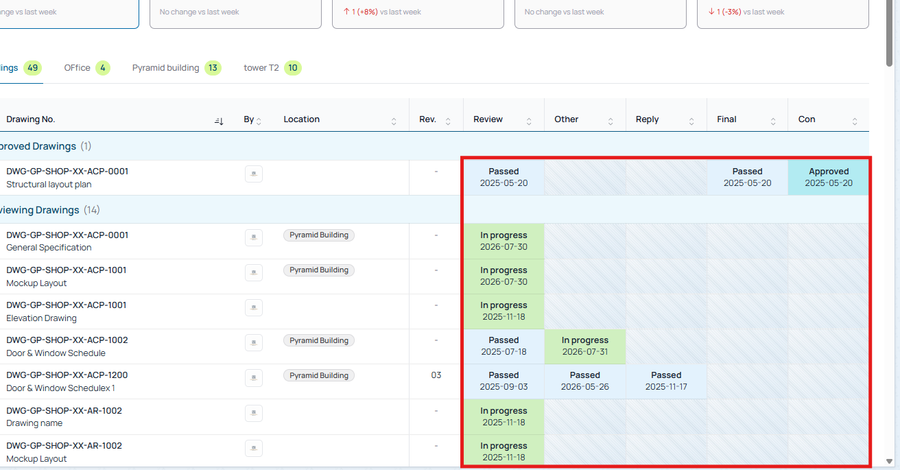
The drawing name now sits under its number in a single column, text is the same size as every other table in the system, and the five review-stage columns (Review / Other / Reply / Final / Con) sort by their dates.

Improved2.0.22.0.2-CHG-12

The drawing file viewer

PDF read mode fills the panel when maximised, the markup toggle joins the other controls in the header, and files open and download named after the drawing number instead of an unreadable file id.

Improved2.0.22.0.2-CHG-13

Drawing location is its own column

Moved out from under the drawing name to a column of its own after the number, shown as a badge per building with the floors it covers, and sortable by location.

Improved2.0.22.0.2-CHG-14
Stages that never applied to a drawing — These cells now carry a diagonal pattern instead of a dash, which read as missi

Stages that never applied to a drawing

These cells now carry a diagonal pattern instead of a dash, which read as missing data. The Reply column shows replies made through forwarding, and vertical rules make a row easier to follow.

Improved2.0.22.0.2-CHG-15

Collapsible group bands in the drawing register

Bands such as "Approved Drawings (328)" fold away so only the group in hand is on screen.

Create-time options: CC recipients, Urgent, reviewer and references

When creating a document you can pick CC recipients by position, mark it Urgent, choose the reviewer, add your signature, reference other documents, and attach the drawings being submitted.

Drawings

Drawings: drawing numbering, phases, new uploads and revisions, linking drawing approval to an RFA, and a drawing-status overview.

All featuresMobile & LINESignatures & SecuritySite WorkDashboards & Traffic MapDocuments & WorkflowPlatform & AI

See it on your project — request a demo →